

Introduction
Blog
I chose my blog as the platform for this communication to reach a wider range of readers than an email or Facebook post would. Unlike those other methods, it is structured so that, although it may be too long-winded for some, it can be easily scanned and, through the headings sections, will appeal to varying degrees. Although aimed primarily at family members, I believe it may also be relevant to anyone new to, or planning a family tree. Blog followers may also find stories from my tree interesting.
Mission
Over the past 12 months of building my Family Tree, named Hilton-Slater, my objective was to focus on the families of myself and my wife Margaret. While researching and following leads, the discoveries of spouses, their siblings and children, steered me off-piste! I gained experience while gathering much evidence and detailed information as my tree expanded, but moved further away from my original purpose. There are now more than 1,100 people in the Hilton-Slater tree!
New Strategy
If I spend the next 50 years following the same expanding tree discoveries, the Hilton-Slater families will not get the necessary attention. So, what’s my plan? Well, I don’t have 50 or so more years to devote to the lateral expansion of the tree. I also don’t want the wealth of data that I have amassed in this area to remain exclusive to me. Hence this blog post – is aimed at extended family members. Some of you may have established, or toyed with, family trees, in which case they might cross paths with mine. Instead of finessing these mutual tree branches alone, I wish to share my collated data. Everyone is welcome to copy any detail they don’t already have and/or offer corrections to my mistakes! I would also welcome new information that can plug gaps in any person’s record in my tree.
The Hilton-Slater Tree
Why the Tree was Built Using Geneanet
A few years back, I registered with Genes Reunited but my efforts at constructing a family tree were minimal! More recently, I registered, without subscribing, with Findmypast, MyHeritage and Ancestry. Free weekend access to census records offered by Findmypast sparked my interest, and then I discovered and registered with the FamilySearch genealogy site. Through FamilySearch usage, I registered with the Archives and Geneanet sites. Beginning to take a stronger interest in exploring my roots, I resolved to look for a permanent home for my research.
I planned to look for and take up any free offers from the sites I had registered with. Keeping the momentum going during my wait, I looked at options available for subscription, in terms of commitment, price and outlay. At £11 for three months Geneanet won my approval and I began evaluation whilst forming a family tree. Geneanet’s search facilities obviously fall short of those offered by the more expensive sites and will often return records that I can find for free with FamilySearch, LancashireBMD and FreeBMD.
Geneanet does not search census records, although it sometimes returns results of other records I had not found on FamilySearch. My tree building was going well and I liked other aspects of the site, so I renewed my subscription. I have explored other site subscriptions but keep my Geneanet subscription current.
My Geneanet Family Tree
Finding a Way Through My Tree on the Geneanet Site
I will now prepare the ground to enable those who wish, to easily get to and share the data I have collected regarding our mutual relatives. From the data, you will see where those people lived, who they lived with, what their jobs were and who they were married to. There will be facts and stories that may surprise or entertain you!
The familiar tree structure can be displayed in several formats and options. In common with trees on other sites, once a female spouse is clicked, the view opens up to their family and the focus moves away from the male spouse’s family. Each time this is done, you move further away and, like in a maze, it is easy to get lost and not find your way back! The easiest way to combat this is to put the name of the person you wish to get back to in the search field.
That’s enough about the tree structure! The real meat of a family tree is the data that is attached to it. Data is input/gathered, when adding a new person, or through editing. It is viewable as facts or in story form on two additional tabs next to the Family Tree tab.
What Visitors See
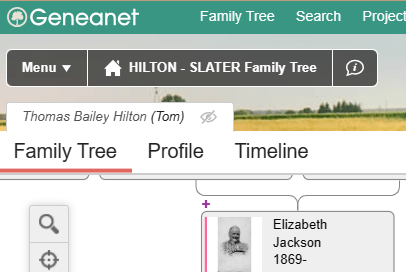
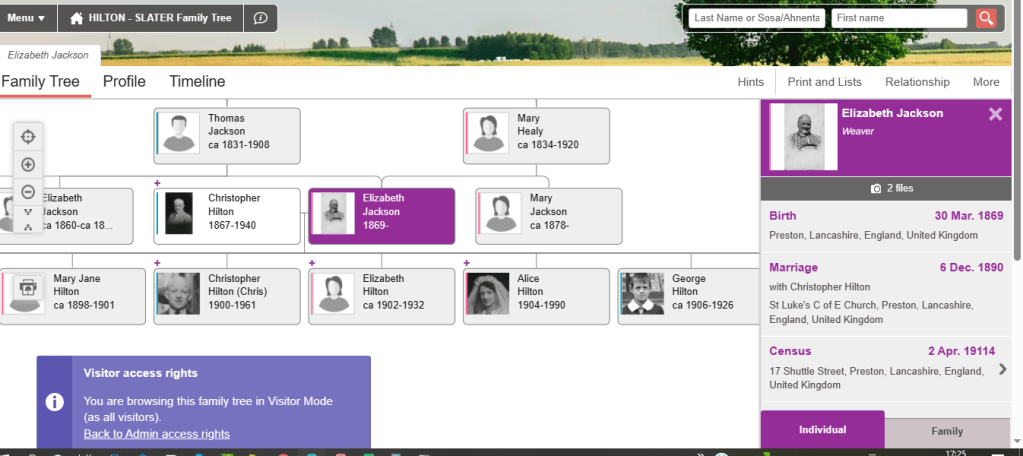
Only administrators have access to the editing tools, used to effect the collection and presentation of data. Tree and event data is still available in the tree view for visitors. Notes, attached to events only appear (unformatted) in the Profile and Timeline views.
What Administrators See
I include this admin info to explain how I input my data and give insight to others who wish to use Geneanet for their tree and whereby, become default administrators.
Administrator access, with the ‘Family’ tab selected. The ‘Edit relationship’ button is now present and, under Elizabeth in the tree, a button for selecting editing tools relevant to Elizabeth has appeared. With the ‘Individual’ tab selected, access to the ‘Edit individual’ button is allowed.

When the ‘Edit relationship’ button is clicked, the ‘Edit family’ screen appears. Although ‘Male’, ‘Female’ and ‘Marriage’ are displayed by default, sex and relationship can be edited. I frequently use the ‘+ Add information’ buttons; each time I locate a record, I copy relevant data and add it in a note attached to an event, e.g. the ‘Family members’ present during a Census event. The more events for which information can be found and attached, the longer and more interesting the Timeline becomes!
The side-by-side layout allows easy copying of data for common events, from one spouse to the other, ensuring the event appears in each Timeline’. I format key information and then add source and citation information.

Examples of How I Use Notes
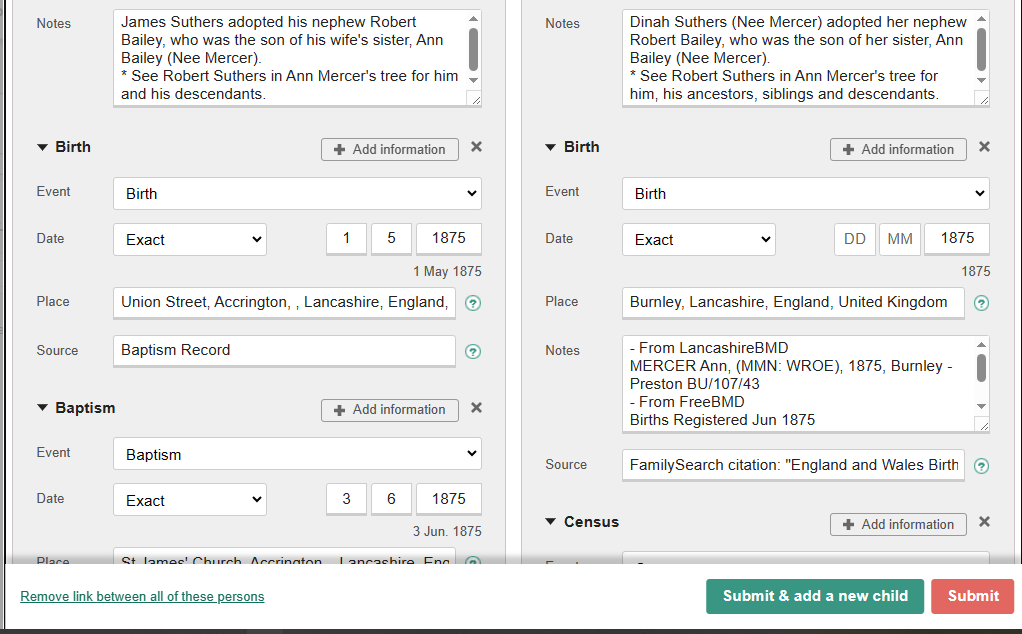

As the Family screen is scrolled, the children are listed together with their birth/death dates.
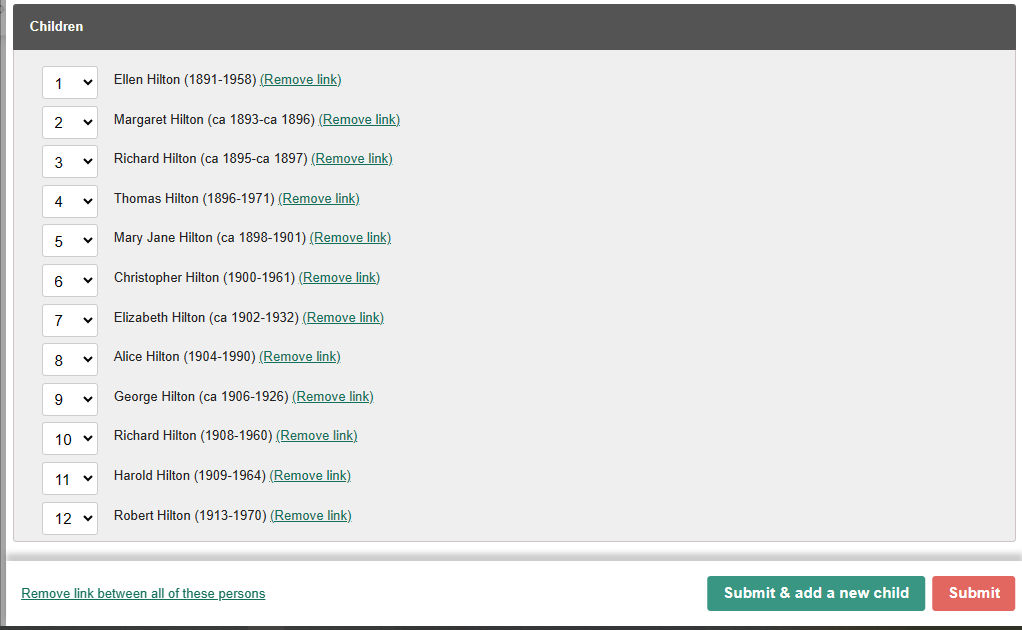
The Tree and Data
How I Use the Data
As mentioned, I format data copied from records (removing tabs, adding spaces and commas, and then deciding the placing of line breaks) to make it easier to read. In this user-friendly form, I can re-copy and use it elsewhere. To explain how and why I do this, let’s use a census record as an example.
Including a Census Event
Having searched for, and found, the record for the man I wish to add to my tree, I can now use the census information to create the new person, add his name, an estimated D.O.B. and a census event, including a note containing the data copied from the record.
In this case, the man is not alone on the census record. He has a spouse and children – more people to add to my tree! After copying the formatted content of the note, and then adding the census date and abode at the time of the census, to a Notepad document, I can click the ‘Submit’ button (to save the new person to the tree, where he will then appear). Clicking on the editing tools icon below the new man in the tree allows me to add a spouse.
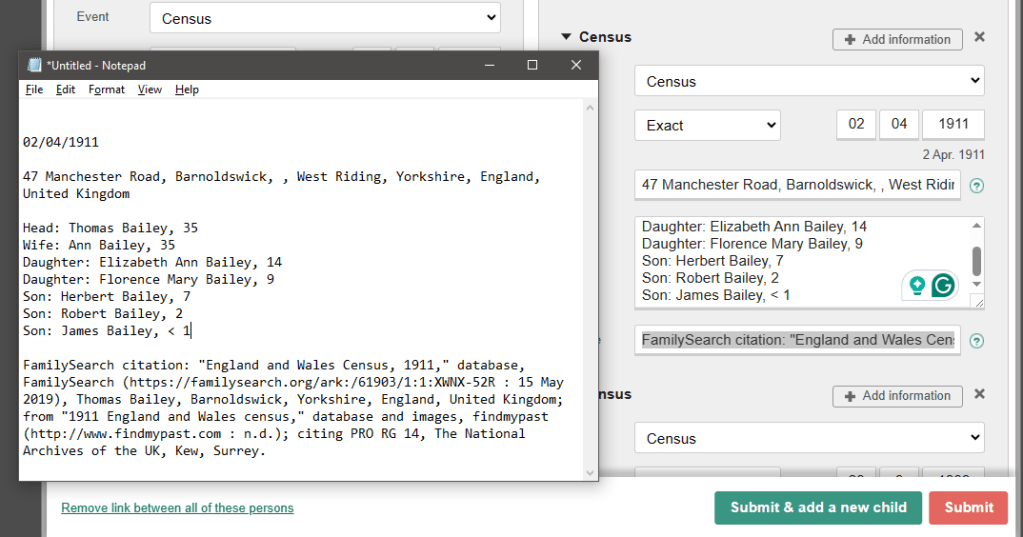
For clarity, I removed the citation data, originally positioned below the final family member on the census record (above image), before placing it in the image below. More about citations (and FamilySearch citations) later.
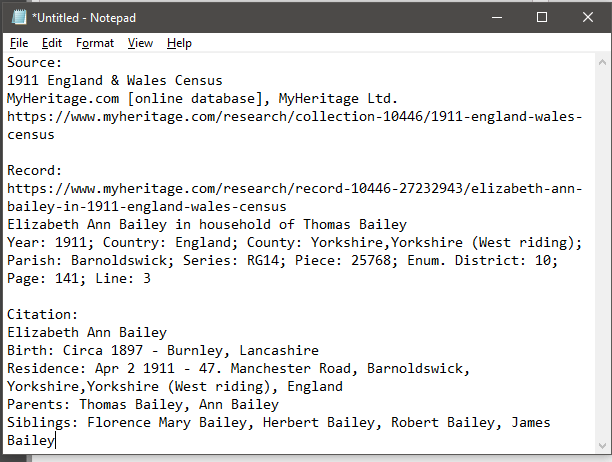

Adding a Spouse and Children
Clicking the ‘Add spouse’ button reveals the ‘Edit Family’ side-by-side screen, with the new man’s details, including the census event and note, on the left and the spouse’s form on the right. Next, the spouse’s D.O.B., the census event and its note, can be copied from the Notepad document. The couple’s children and their details can be added from the same screen (‘Submit and add new child’ button). The couple’s Marriage details can be added later.
That concludes the quick run-through of how I use data. I hope it has provided insight into how I save the information I find digitally; it is easily accessed and is used to appear in the Profile and Timeline of the tree.
The Profile
The ‘Profile’ tab of the tree contains all the essential information that is known regarding data entered about the person, their parents, spouse, children and life events.
Copying Data
Without Administrator access, the formatted data is not visible, but events containing useful, unformatted data are available in the ‘Profile’ tab of the family tree. In this form, the event data are difficult to read but easily copied into a blank Notebook document ready to be formatted to look similar to the example in the previous section (or to your taste).
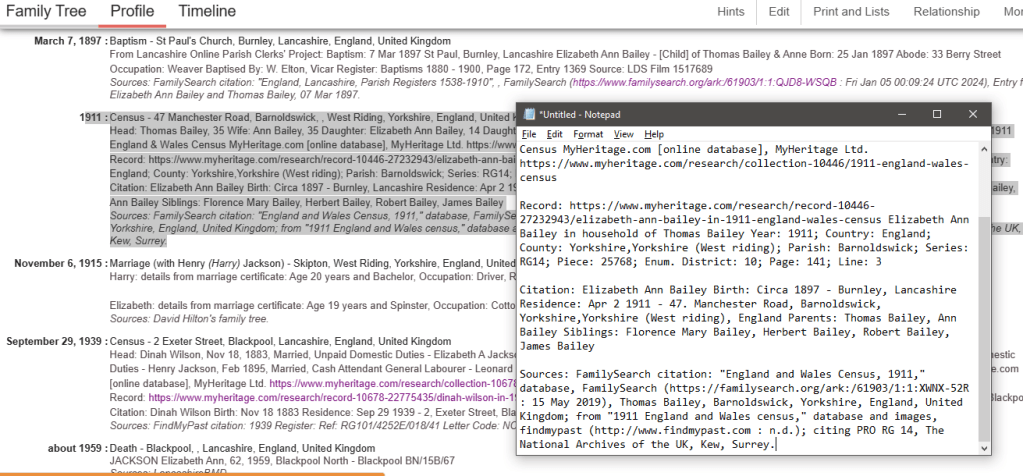
The Data
Once I find relevant information in records, I copy that information into notes so I do not need to look up the records again. But where do I find the records that hold the information? The answer is genealogy sites. I have previously mentioned these (The Hilton-Slater Tree near the start of this post). Most sites require a subscription to be paid before full access to a record is granted. Access is denied once a subscription expires, so without plentiful funds to call upon, record data will cease to be viewable! This is the key reason for keeping a copy of important record data.
Genealogy Sites
To amass the depth of information I am including in my tree, I followed my plan of investigating what various sites had on offer. I believed Ancetry may be the best of the sites so I chose to keep that as my final option. Here are my experiences and observations of the journey through the other sites.
FamilySearch
Registering an account with this site, run by The Church of Jesus Christ of Latter-Day Saints, results in its FREE usage! The concept of a Global Family Tree is fine, however, the cons from my point of view, are that branches/individuals added may be edited by others and mistakes/incorrect information brought into the tree. I prefer an exclusive Family Tree, where errors are mine alone!
Despite this drawback (for me), I find the site extremely useful for record searches and now add citations from them as a backup to data I have sourced elsewhere (see ‘Including a Census Event’ for example). I add these citations into the ‘Source’ box following the input of ‘FamilySearch citation:’ as in the example below.
FamilySearch citation: Image 318: – “England Births and Christenings, 1538-1975”, database, FamilySearch (https://www.familysearch.org/ark:/61903/1:1:NPXG-8MK : 3 February 2023), Mary Leeming, 1793.
Often, records include an image of the original record. Sometimes that image needs to be picked out from a group of up to thousands. Where this happens, and I have located the image, I include a reference here. To revisit the record (and view its image) there is a link within the citation
https://www.familysearch.org/ark:/61903/1:1:NPXG-8MK in this case.
The citation also contains the record set information required to view or order a copy certificate from the local record office.
Findmypast
I’ve mentioned how Findmypast sparked my interest because of their offer of free weekend access to all census records up to 1911. In 2021, when they released the 1921 census, I learned I could purchase individual 1921 census transcriptions for the price of a pint or census images for a little more without a subscription. Two transcriptions I purchased, showed me vital information missing from my family history. The following year, I took out a one-month subscription, with auto-renewal for two months, before cancelling. Findmypast is very good for census records but expensive if including the 1921 Census in a subscription!
MyHeritage
I left Findmypast to explore MyHeritage and took out a subscription to have the Hilton Website hosted and managed for 12 months. A month into the subscription I realised that it did not include data! As I needed to aquire data somewhere, I decided to take out a data subscription to run along the website.
In February 2024 I received a sales call from MyHeritage US, which was enlightening. During our conversation, I revealed I would cancel my automatic subscription renewal and leave future research to my family; my tree is growing elsewhere, I can’t keep pace with tree discoveries and smart matches from MyHeritage, and I no longer require the Hilton Website. I was offered, as a senior, to continue with data only at 15% discount to extend the plan until July 2025. I have made, and continue to make, extensive use of the data search facilities, which are excellent.
Ancestry
Although I have yet to start a free trial or subscribe, I have uploaded my tree and viewed other people’s trees.
Births Marriages and Deaths (BMD)
These comprise the Civil Registrations of Births, Marriages and Deaths by Registrars. Copies of Birth, Marriage and Death registers are kept by the General Records Office (GRO) and can be viewed at Local Record Offices (LRO), large libraries and FamilySearch centres. Churches maintain their own Baptism, Marriage and Burial records. Record transcriptions, carried out by Genealogy sites, are shown when a record is looked up. Additionally to the global genealogy sites, there are local FREE BMD sites. Here are some I have used and found to be useful.
LancashireBMD
https://www.lancashirebmd.org.uk
Birth, Marriage and Death Indexes may be searched for Lancashire. The date range of 1837 to 2007 is the only period searchable within the indexes and covers LANCASHIRE within its 1837 – 1974 boundaries and then, in the county’s current form, from 1974 – 2007. As transcription is ongoing, the Indexes aren’t complete for all years and districts.
FreeBMD
These indexes cover the whole of ENGLAND and WALES. Like LancashireBMD, FreeBMD is an ongoing project, in their case covering the period 1837 – 1997. They too have not yet transcribed the whole period. A search in FreeBMD also returns a link to an image of the entry in the index.
Online Parish Clerks Project
©Lancashire OnLine Parish Clerks
Ten other sites are linked to the Online Parish Clerks Project but I have used the Online Parish Clerks for Lancashire site. Although it doesn’t contain Births and Deaths records, Baptisms and Burials records can be found here as well as Marriage records. Data and records are presented from the earliest records that can be found up to approximately the end of the 19th century. At that time there were almost 400 parishes within the pre-1974 county boundaries of Lancashire. Data presented in the records is extensive, often including birth or death dates and the names of family members. Not all churches have had their records transcribed. Volunteers are still working on the ongoing project.
Records
The most common records researched are Census, BMD, Baptisms and Burials. There are many others too numerous to discuss. Most original documents relating to the records I’ve discussed contain handwritten data. To manipulate this handwritten data it must first be transcribed in typed electronic form. This can lead to the data viewed online containing errors.
Census
Modern UK Censuses have been undertaken every 10th year since 1841 and collected data is retained by the Government. Access is granted to each census after 100 years. The 1841 census was quite primitive compared to how censuses have evolved. For example, the relationship of occupants was not recorded, nor was their place of birth other than whether born in the county of their residence or not, and if anywhere other than England or Wales.
Names, ages, sexes, occupations and places of birth of each individual living at the address had to be recorded on pre-printed census schedules, which were left with a household before being collected by an enumerator. Children under 15 were to have their age recorded accurately, while those over 15 were to be rounded down to the nearest 5 years so, for example, someone aged 63 should be recorded as 60. However, not all enumerators followed this instruction and exact ages may have been recorded. The enumerator helped to record the information for illiterate households.
Collected schedules were copied by the enumerator in ‘Census Enumerator’s books’. As the original census schedules have been destroyed, it is the census enumerator’s books that researchers can see. Unfortunately, there can be mistakes in the records, as the enumerator would be transcribing the information from the original schedules into the official books. Additionally, the spelling of names was often left to the enumerator’s interpretation. Consequently, names, ages, dates of birth and place names changed as censuses evolved.
Parish Registers
Tracing family roots to before 1837, when BMD records began, is possible by researching church registers for Baptisms, Marriages and Burials. From 1597, second copies of register entries were sent to the Bishop. Bishop’s Transcripts are often in better condition and more legible. Parish Registers/Bishops’ Transcripts, like BMD and Census records, have been photographed and transcribed to various sources. During a similar journey, gathering data, to its final appearance online, errors may have been introduced.
Summary
Whether reading the whole post, choosing paragraphs of interest, or scrolling, you have arrived here! To summarise, this post was written to explain where the data you are about to view came from and how I gathered it into my tree.
Timelines
Timelines provide interest relative to the information added to the person. It’s only since I have become more proficient that I have begun spending time finding that information. I’m now revisiting the earlier entries in the tree to add more facts.
Family Tree
Hilton-Slater Family Tree – Clicking the link will open my tree in a new tab.
Switch between tabs to alternate between reading this post and opening up ‘Timeline’ examples.
Why not try the search facility (top right on the Family Tree page in the new tab)!
Enter the ‘Last name’ and ‘First name’,
as detailed below for the first example
– see an example of a life logged in the tree.
Interesting Timelines
Although the notes displayed in ‘Profile’ and ‘Timeline’ are not formatted, they give good insight and can be copied and easily formatted elsewhere.
Great Grandfather’s single mother, Elizabeth Hilton – 1824
Enter ‘Hilton’ ‘Elizabeth’ into the search boxes and click the search magnifying glass, then select:
‘Elizabeth Hilton ca 1824-1877, & Richard Holding, John Dobson‘
from the list that appears.
This opens her ‘Profile’ tab.
Scroll down to ‘Notes’ and read the ‘Individual Note’
To resolve this mystery may take a DNA search!
At the top of the page can be seen ‘Family Tree’ ‘Profile’ ‘Timeline’
Click on ‘Timeline’
Now you know how to use the search box!
However, I will now provide links to simplify further searches.
This selection was chosen because substantial attached data and/or media make their ‘Timelines’ into interesting stories.
William Slater ca 1822-1902, & Jane Walmsley
100+ years and the Slaters have never been far from Bamber Bridge!
Click on William above to go to his ‘Profile’ and, while in the profile, click the top image and +- to see how close-knit the families were. Then explore the ‘Timeline’ and ‘Family Tree’ tabs.
Jane Tatterson
This is an example of unresolved ‘detective’ work. It is so easy to get deeply drawn into mysteries!
Harold Hilton
Another mystery, closer to being unravelled. Media adds to the story in the ‘Timeline’.
Robert (Bob) Suthers 1908-1994, & Florence Wilkinson, Gwendoline Norah (Gwen) Cowell
Mystery finally solved in this ‘Timeline’!
Margaret Mary (Marie) Rigby 1920-1994
Don’t say Merseyside, when you mean Lancashire!
Kenneth (Ken) MacKay 1935-2023
Lastly – To Buckingham Palace!
And now you!
Are you ready to put your name into the search boxes and see how far that takes you into your ancestors in the tree?
Conclusion
If you just scrolled here you missed out but there’s still a chance to sample something to grab your attention. Click on one of the names above!
Whether you’ve read the whole post, cherry-picked or scrolled to this point, I hope that relevant interest levels have been raised and that my mission to grow and disseminate the Hilton-Slater family tree through descendants and branches gains support.
If family trees are not your thing at present, or if you haven’t had time to read or fully take in the post, why not bookmark it as a reference point you may return to.
Next Steps
Family Tree Charts
I have imported the Hilton-Slater tree into Ancestry, Findmypast, MyHeritage and Geni but the media is not included. The notes in the events are also truncated. Feel more comfortable navigating tree charts on one of these sites? I can send a link if required.
Guest Access and GEDCOM
For a better viewing experience of the Hilton-Slater tree, I can provide Guest Access by request. This allows the same access rights as an administrator, except for the right to change the tree or data. I can only do this via an email invitation so, if you would like an invitation, email me at the address below and I will send the invitation by return.
Also, for those who may wish to benefit, I can send a copy of the latest GEDCOM file of the Hilton-Slater tree. This can then be renamed, downloaded into the recipient’s genealogy software, then chopped and changed to their delight.
New Data
In my quest for new data, I would be pleased to receive Marriage, Birth, Christening, Death and Burial/Cremation data; names, dates and places too recent to have found their way online yet. Photos or stories you might like me to attach would also be welcome.
Privacy
Data attached to Ken MacKay was, by default, not displayed to visitors under the 100-year rule. However, as all is in the public domain online, I decided to force public display access. Should there be anything in the tree that anyone wishes to be made private, please let me know. On the other hand, I can make public any newer information for which you give permission.
From Geneanet
Only the first name, last name and parentage of contemporary individuals born less than 100 years ago (depending on your settings) will be displayed to visitors. Confidential information (dates, photos, places, notes, etc.) will not be displayed.
You can use the “Private individuals” option below to completely privatize any person aged less than 100 years.
An automatic calculation is done to estimate the date of birth of persons with no date in your family tree.
Questions
You’ve finally reached the end of this post! Thank you for getting so far!! If it has aroused enthusiasm for our extended genealogy, that’s progress. Feel free to share the post with your family. If it’s caused confusion or a need to know more, you can send me any questions or comments to my email below.
tomnaboya@gmail.com
-o0o-
 Geriatric Musings
Hi Tom, Val here, your blog is amazing and I must admit that I am going to have to visit again and again to fully understand it all but that I will put down to age !!!! So much wonderful information and help, thank you for the invote
LikeLike